
Heat haze distortion card
In your harnessGodot shaderMIT
Place a card over a hot area to shimmer the scene behind it: scrolling noise offsets the screen texture, rising faster toward the top, faded at the card edges and by distance.
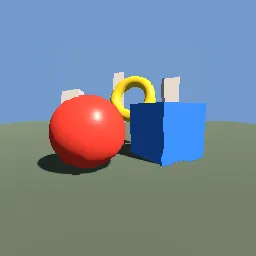
What it takes and gives
- Shader type
- spatial
- Render modes
- unshaded, cull_disabled, depth_draw_never, shadows_disabled
- Parameters
- screen_texture (sampler2D), strength (float = 0.018), noise_scale (float = 9), rise_speed (float = 1.4), edge_softness (float = 0.25), top_fade (float = 0.6), distance_falloff (float = 0.15), tint_amount (float = 0.04)
- Use it on
- A QuadMesh or other card placed over the hot area.
- Result
- A shimmering patch where the scene behind ripples upward.
- Renderers
- compatibility: compiled and rendered, forward plus: not verified, mobile: not verified
- Placement
- res://baltor/godot_shaders/heat_haze_distortion/
Limits. Screen-space: it cannot show what is off screen and cannot distort other transparent objects. A card seen edge-on disappears. The distortion is an artistic noise field, not a refraction calculation.
Details
- Kind
- Godot shader
- Engine
- Godot 4.3 or later
- Files
- 11 files, 63.7 KB
- Licence
- MIT
- Declared effects
- reads files, runs commands
- Checked with
- Godot 4.7.2, opengl3 compatibility (Mesa llvmpipe, Xvfb)
- Checks
- contract static, engine run, engine log clean, shader in scene, capture written, render not uniform, shader changes pixels
- Techniques
- Screen texture offset by scrolling value noise, UV and distance based effect masks, Value noise with quintic interpolation and fractional Brownian motion
- Tags
- godot shader, spatial, heat haze, distortion, screen texture, shimmer, fire
- Identity
library.supply.creative_originals.85c4e15fccac30802366499d.96b5e3b5c35b4bbe- Version
96b5e3b5c35b4bbeb6ed562cd96826fb541e7dafb65b15d76be0586698417d8a
The version is the SHA-256 of the item your harness downloads; every file in it names its own checksum.
Related files
 Screen-space glass refraction with dispersionIn your harness
 Procedural fire on a camera-facing cardIn your harness
Something wrong with this item, its rights or its safety? Report it on the support page, or from your harness after a download.