
2D laser beam with core, glow and sparks
In your harnessGodot shaderMIT
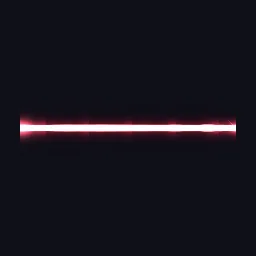
Draw a horizontal laser across a rectangle: a hot core and coloured glow with noisy width, pulses travelling along it, a flare at the emitter end and sparkling impact at the far end.
What it takes and gives
- Shader type
- canvas_item
- Parameters
- core_color (vec4 = 1, 0.95, 0.95, 1), beam_color (vec4 = 1, 0.15, 0.3, 1), core_width (float = 0.04), glow_width (float = 0.18), flicker (float = 0.3), pulse_speed (float = 3), pulse_spacing (float = 0.2), flare_size (float = 0.18) and 1 more
- Use it on
- A ColorRect stretched along the beam (rotate it to aim).
- Result
- A red laser with a white core crossing the rectangle, flared at the left and sparkling at the right.
- Renderers
- compatibility: compiled and rendered, forward plus: not verified, mobile: not verified
- Placement
- res://baltor/godot_shaders/laser_beam_2d/
Limits. Stretching the rectangle stretches the glow; adjust widths to its aspect. The beam is straight.
Details
- Kind
- Godot shader
- Engine
- Godot 4.3 or later
- Files
- 11 files, 53.4 KB
- Licence
- MIT
- Declared effects
- reads files, runs commands
- Checked with
- Godot 4.7.2, opengl3 compatibility (Mesa llvmpipe, Xvfb)
- Checks
- contract static, engine run, engine log clean, shader in scene, capture written, render not uniform, shader changes pixels
- Techniques
- Distance-based core and exponential glow, Noise-modulated width, Endpoint flares, Value noise with quintic interpolation and fractional Brownian motion
- Tags
- godot shader, canvas item, laser, beam, vfx, sci-fi, 2d
- Identity
library.supply.creative_originals.823a878e2bf2e201dbdfc08e.37b884aa2e6de8dc- Version
37b884aa2e6de8dc6164a750f7f1cc4f0e305801dda846f42c28835683c51ba8
The version is the SHA-256 of the item your harness downloads; every file in it names its own checksum.
Related files
 Procedural lightning bolt with branchesIn your harness
 Energy beam with scrolling core and jitterIn your harness
Something wrong with this item, its rights or its safety? Report it on the support page, or from your harness after a download.