
Matcap shading with a procedural sphere texture
In your harnessGodot shaderMIT
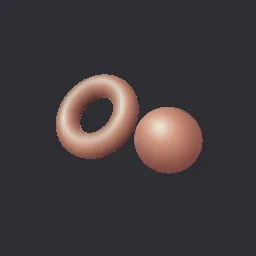
Light a mesh entirely from a matcap: the view-space normal looks up a lit-sphere texture, so shading is baked and costs one sample. Ships with a procedural gradient matcap and accepts any matcap image.
What it takes and gives
- Shader type
- spatial
- Render modes
- unshaded
- Parameters
- matcap (sampler2D), tint (vec4 = 1, 1, 1, 1), rim_strength (float = 0.25), rim_color (vec4 = 1, 1, 1, 1), cavity_strength (float = 0.3)
- Use it on
- Optional: a square matcap image assigned to
matcap(the bundled material uses a procedural one). - Result
- Objects shaded like soft clay from the matcap colours, the same from every light setup.
- Renderers
- compatibility: compiled and rendered, forward plus: not verified, mobile: not verified
- Placement
- res://baltor/godot_shaders/matcap_gradient/
Limits. Lighting is fixed to the view, so it turns with the camera and never casts or receives shadows. The cavity term only darkens where normals change within a pixel quad, which is subtle on smooth meshes. Matcaps with a visible horizon look wrong when the camera rolls.
Details
- Kind
- Godot shader
- Engine
- Godot 4.3 or later
- Files
- 11 files, 61.4 KB
- Licence
- MIT
- Declared effects
- reads files, runs commands
- Checked with
- Godot 4.7.2, opengl3 compatibility (Mesa llvmpipe, Xvfb)
- Checks
- contract static, engine run, engine log clean, shader in scene, capture written, render not uniform, shader changes pixels
- Techniques
- Matcap (lit sphere) lookup from the view-space reflection vector, Facing ratio rim, Derivative cavity approximation
- Tags
- godot shader, spatial, matcap, lit sphere, sculpt, unshaded, preview
- Identity
library.supply.creative_originals.63c643e615bf0cc3d74cbf24.2eeacedc842b8c13- Version
2eeacedc842b8c13b684b1ce4138c3a9a2539c09bfb724f3348dc01eb4568eb0
The version is the SHA-256 of the item your harness downloads; every file in it names its own checksum.
Related files
 Lighting through an artist colour rampIn your harness
 Toon shading in bands with a rim lightIn your harness
Something wrong with this item, its rights or its safety? Report it on the support page, or from your harness after a download.