
Palette swap by colour keys
In your harnessGodot shaderMIT
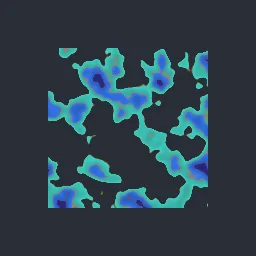
Recolour sprites at run time: up to three source colours are matched within a tolerance and replaced by target colours, optionally keeping the original shading, for team colours, skins and enemy variants.
What it takes and gives
- Shader type
- canvas_item
- Parameters
- key_1 (vec4 = 0.95, 0.6, 0.25, 1), target_1 (vec4 = 0.25, 0.8, 0.75, 1), key_2 (vec4 = 0.85, 0.35, 0.3, 1), target_2 (vec4 = 0.2, 0.45, 0.9, 1), key_3 (vec4 = 0.55, 0.2, 0.35, 1), target_3 (vec4 = 0.15, 0.15, 0.45, 1), tolerance (float = 0.16), softness (float = 0.1) and 1 more
- Use it on
- A Sprite2D (or other textured CanvasItem) with transparent space around its shape, assigned to the node as usual.
- Result
- The orange, red and purple sprite recoloured to teal, blue and navy.
- Renderers
- compatibility: compiled and rendered, forward plus: not verified, mobile: not verified
- Placement
- res://baltor/godot_shaders/sprite_color_key_swap/
Limits. Matching is by RGB distance, so similar colours elsewhere in the sprite can be caught; author sprites with distinct key colours. Three pairs per material.
Details
- Kind
- Godot shader
- Engine
- Godot 4.3 or later
- Files
- 11 files, 72.8 KB
- Licence
- MIT
- Declared effects
- reads files, runs commands
- Checked with
- Godot 4.7.2, opengl3 compatibility (Mesa llvmpipe, Xvfb)
- Checks
- contract static, engine run, engine log clean, shader in scene, capture written, render not uniform, shader changes pixels
- Techniques
- Colour keying by RGB distance with soft tolerance, Shading preservation by luminance ratio
- Tags
- godot shader, canvas item, palette swap, recolor, sprite, team colors, 2d
- Identity
library.supply.creative_originals.5a5a3030d71279f3f3b20832.a63219fa941f7d22- Version
a63219fa941f7d2297a7bf067823f88116b12bba572cbdea9f774d6414da4eae
The version is the SHA-256 of the item your harness downloads; every file in it names its own checksum.
Related files
 Hue, saturation, value and sepia adjustmentIn your harness
 Pixelation with nearest-colour palette mappingIn your harness
Something wrong with this item, its rights or its safety? Report it on the support page, or from your harness after a download.