
World-space prototyping grid
In your harnessGodot shaderMIT
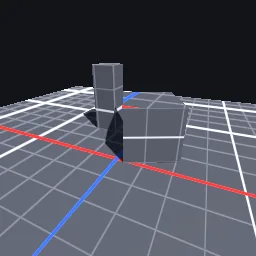
Anti-aliased world-space grid for level blockouts: minor and major lines of constant pixel width, X and Z axis lines in colour, projection picked from the dominant normal axis so floors and walls both get squares, and distance fade.
What it takes and gives
- Shader type
- spatial
- Parameters
- base_color (vec4 = 0.32, 0.34, 0.38, 1), minor_color (vec4 = 0.48, 0.5, 0.55, 1), major_color (vec4 = 0.82, 0.84, 0.88, 1), cell_size (float = 0.5), major_every (int = 4), line_pixels (float = 1.2), show_axes (bool = yes), fade_distance (float = 40) and 1 more
- Result
- Grey surfaces with crisp light grid lines, heavier every few cells, and red and blue axis lines on the floor.
- Renderers
- compatibility: compiled and rendered, forward plus: not verified, mobile: not verified
- Placement
- res://baltor/godot_shaders/world_grid_debug/
Limits. Sloped surfaces snap to the nearest axis plane, so lines stretch on 45 degree slopes. The grid is fixed in world space and slides across moving objects. Lines thinner than one pixel fade instead of vanishing.
Details
- Kind
- Godot shader
- Engine
- Godot 4.3 or later
- Files
- 11 files, 80.7 KB
- Licence
- MIT
- Declared effects
- reads files, runs commands
- Checked with
- Godot 4.7.2, opengl3 compatibility (Mesa llvmpipe, Xvfb)
- Checks
- contract static, engine run, engine log clean, shader in scene, capture written, render not uniform, shader changes pixels
- Techniques
- Screen-space derivative (fwidth) line anti-aliasing, Dominant-axis planar projection
- Tags
- godot shader, spatial, grid, prototyping, blockout, debug, level design
- Identity
library.supply.creative_originals.f835a34b4402b1cd7bbd5949.ca0cadb4370d2cff- Version
ca0cadb4370d2cff166f54d476dbaabcc239cf14113fd9ce2df26db94d373dd1
The version is the SHA-256 of the item your harness downloads; every file in it names its own checksum.
Related files
 UV checker with direction ramps and stretch mapIn your harness
 Geometry debug views: normals, tangents, UV, depthIn your harness
Something wrong with this item, its rights or its safety? Report it on the support page, or from your harness after a download.