
Curved world bend by camera distance
In your harnessGodot shaderMIT
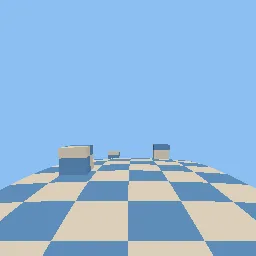
Bend everything that uses the material downward with the square of its horizontal distance from the camera, so the world curves away like a small planet or a rolling log, with a checker pattern to show the bend.
What it takes and gives
- Shader type
- spatial
- Parameters
- curvature (float = 0.02), sideways_curvature (float = 0), flat_radius (float = 2), color_a (vec4 = 0.85, 0.82, 0.75, 1), color_b (vec4 = 0.35, 0.55, 0.75, 1), checker_size (float = 1), roughness (float = 0.8)
- Use it on
- Meshes with enough vertices along the bend (the demo road has 200 rows); other scene materials need the same vertex code to match.
- Result
- A checkered road and blocks that curve down and to the side toward the horizon.
- Renderers
- compatibility: compiled and rendered, forward plus: not verified, mobile: not verified
- Placement
- res://baltor/godot_shaders/curved_world_bend/
Limits. Visual only: physics, raycasts and culling use the unbent positions, so objects near the frustum edge can pop. Normals are not updated for the bend. Large flat polygons do not bend; subdivide them.
Details
- Kind
- Godot shader
- Engine
- Godot 4.3 or later
- Files
- 11 files, 50.9 KB
- Licence
- MIT
- Declared effects
- reads files, runs commands
- Checked with
- Godot 4.7.2, opengl3 compatibility (Mesa llvmpipe, Xvfb)
- Checks
- contract static, engine run, engine log clean, shader in scene, capture written, render not uniform, shader changes pixels
- Techniques
- World-space quadratic vertex bend by camera distance, World checker pattern
- Tags
- godot shader, spatial, curved world, vertex shader, stylized, runner, world bending
- Identity
library.supply.creative_originals.387d6e0a50705bbee63117e4.07a47e6038d84f5d- Version
07a47e6038d84f5db08a0adb9c68ff6a1dde0ec6b9e57d5d85b4139ee4baf4af
The version is the SHA-256 of the item your harness downloads; every file in it names its own checksum.
Related files
 Retro console look: vertex snapping and affine texturesIn your harness
 Twist deformation around the vertical axisIn your harness
Something wrong with this item, its rights or its safety? Report it on the support page, or from your harness after a download.