
Gooch cool to warm technical shading
In your harnessGodot shaderMIT
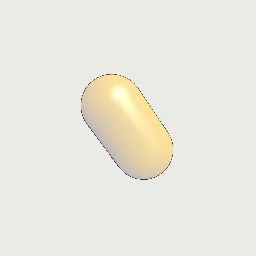
Shade a mesh from a cool tone facing away from the light to a warm tone facing it, with a white Blinn highlight and darkened silhouettes, for technical illustration that keeps shape readable in shadow.
What it takes and gives
- Shader type
- spatial
- Parameters
- surface_color (vec4 = 0.72, 0.66, 0.58, 1), cool_color (vec4 = 0.08, 0.16, 0.55, 1), warm_color (vec4 = 0.62, 0.48, 0.08, 1), cool_mix (float = 0.25), warm_mix (float = 0.5), highlight_strength (float = 0.7), shininess (float = 48), edge_darkening (float = 0.7) and 1 more
- Result
- A mesh in blue to yellow shading with a white highlight and darkened outline band.
- Renderers
- compatibility: compiled and rendered, forward plus: not verified, mobile: not verified
- Placement
- res://baltor/godot_shaders/gooch_cool_warm/
Limits. Non-photorealistic. Shadows from other objects are not darkened (Gooch shading ignores cast shadows except in the highlight); environment ambient light adds a uniform term. Edge darkening is a facing-ratio approximation: flat faces seen edge-on darken entirely.
Details
- Kind
- Godot shader
- Engine
- Godot 4.3 or later
- Files
- 11 files, 54.9 KB
- Licence
- MIT
- Declared effects
- reads files, runs commands
- Checked with
- Godot 4.7.2, opengl3 compatibility (Mesa llvmpipe, Xvfb)
- Checks
- contract static, engine run, engine log clean, shader in scene, capture written, render not uniform, shader changes pixels
- Techniques
- Gooch cool-to-warm shading (Gooch et al. 1998), Blinn-Phong specular, Facing-ratio silhouette darkening
- Tags
- godot shader, spatial, gooch shading, technical illustration, npr, custom light function, stylized
- Identity
library.supply.creative_originals.3a3d0167293c5e4cc72ede24.5b0eb99f0275994d- Version
5b0eb99f0275994d9c09b44529ca0c4b7cd8a84906198b00e8707f9166c67c8e
The version is the SHA-256 of the item your harness downloads; every file in it names its own checksum.
Related files
 Toon shading in bands with a rim lightIn your harness
 Pen hatching driven by lightingIn your harness
Something wrong with this item, its rights or its safety? Report it on the support page, or from your harness after a download.