
Pen hatching driven by lighting
In your harnessGodot shaderMIT
Pen-and-ink shading from scene lights: brighter areas stay paper, darker areas get one, two, three and four layers of hatching lines at different angles, aligned to the surface UVs so the strokes stick to the object.
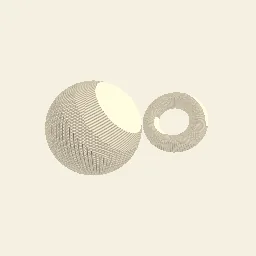
What it takes and gives
- Shader type
- spatial
- Parameters
- paper_color (vec4 = 0.96, 0.94, 0.88, 1), line_density (float = 90), line_width (float = 0.35), level_1 (float = 0.8), level_2 (float = 0.55), level_3 (float = 0.32), level_4 (float = 0.15), ink_strength (float = 0.92)
- Use it on
- A mesh with reasonably even UVs; keep the environment ambient light low so shadows stay dark.
- Result
- Paper-white shapes shaded with layers of crossing ink lines that thicken toward the shadow side.
- Renderers
- compatibility: compiled and rendered, forward plus: not verified, mobile: not verified
- Placement
- res://baltor/godot_shaders/lit_hatching/
Limits. Lines follow UVs, so seams and stretched UVs show in the strokes. Each light adds its own hatching. Ambient light is added unhatched. Lines alias into moire when UV density is far higher than screen pixels.
Details
- Kind
- Godot shader
- Engine
- Godot 4.3 or later
- Files
- 11 files, 69.7 KB
- Licence
- MIT
- Declared effects
- reads files, runs commands
- Checked with
- Godot 4.7.2, opengl3 compatibility (Mesa llvmpipe, Xvfb)
- Checks
- contract static, engine run, engine log clean, shader in scene, capture written, render not uniform, shader changes pixels
- Techniques
- Tonal hatching layers by light thresholds, Derivative anti-aliased procedural lines, Custom light function
- Tags
- godot shader, spatial, hatching, pen and ink, npr, sketch, custom light function
- Identity
library.supply.creative_originals.ab8d23635ad9da7f5ccff79f.d873721654cdb7d3- Version
d873721654cdb7d3e098b83cc3980dfa2c8581e61d718a3bb7611c1774e6a5b9
The version is the SHA-256 of the item your harness downloads; every file in it names its own checksum.
Related files
 Gooch cool to warm technical shadingIn your harness
 Full-screen ink edges from depth and colourIn your harness
 CMYK halftone print screensIn your harness
Something wrong with this item, its rights or its safety? Report it on the support page, or from your harness after a download.