
Hopf fibration fibres as linked circles
In your harness4D geometry toolMIT
Lift base points of S2 to their Hopf fibres in S3, project them stereographically into linked circles, check the fibration's properties (great circles, Clifford parallels, linking number 1, tori over latitude circles), and write tubes plus a colour-matched base sphere as glTF.
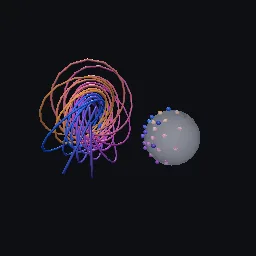
What it takes and gives
- Entry points
- hopf_map, lift, fibre, base_points, colour, is_great_circle, is_circle_3d, linking_number and 6 more
- Outputs
- example.gltf
- Coordinates
- quaternion a + bi + cj + dk at (x, y, z, w) = (b, c, d, a); stereographic image from (0, 0, 0, 1), Godot/glTF +Y up
Limits. Fibres are polygons of the given sample count, so their images are polygonal circles. Base circles must avoid the x axis direction, whose fibre passes through the projection pole and becomes a line; fibres near it become very large. The inset base sphere uses alpha blending.
Details
- Kind
- 4D geometry tool
- Engine
- Python 3.10 or later
- Files
- 10 files, 328.6 KB
- Licence
- MIT
- Declared effects
- reads files, runs commands, writes files
- Checked with
- Godot 4.7.2, gl_compatibility (opengl3, Mesa llvmpipe under Xvfb)
- Checks
- cli rebuilds example, gltf structure example, cli example runs, cli example gltf structure, godot loads example, godot loads cli clifford fibres, preview render
- Techniques
- Hopf fibration S3 to S2, Hopf map q i conj(q), Clifford parallel great circles, Hopf link (linking number 1), stereographic projection, Gauss linking integral, parallel transport frames for swept tubes
- Tags
- 4d, hopf fibration, 3-sphere, linked circles, villarceau circles, clifford parallels, stereographic projection, gltf
- Identity
library.supply.creative_originals.8cfeb9c3b317baca766adef7.03f754d58667be59- Version
03f754d58667be59d73de15e18afdc2fa93a23882c4d2d9fe4876efd35bfd03d
The version is the SHA-256 of the item your harness downloads; every file in it names its own checksum.
Related files
 Uniform point sets on the 3-sphereIn your harness
 Clifford torus in the 3-sphereIn your harness
 600-cell from the binary icosahedral groupIn your harness
Something wrong with this item, its rights or its safety? Report it on the support page, or from your harness after a download.