
Lathe a profile into a solid or a hollow shell
In your harnessBlender toolMIT
Revolve a list of radius and height points around Z into a solid of revolution, with poles on the axis, Chaikin rounding, partial sweeps and an optional wall thickness that turns an outline into a closed hollow vessel. Use it for vases, bottles, cups, lamps and turned parts.
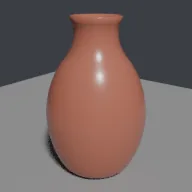
What it takes and gives
- Operator
- baltor.lathe_profile
- Parameters
- profile, segments, thickness, rounding, angle, smooth
- Result
- One closed mesh object named Lathe with a UVMap, axis along Z.
- Blender
- 4.2 or later
- Axes
- Blender Z up, -Y forward
- Units
- metres
Limits. The shell offset moves each profile point along its averaged normal, so very sharp inner corners or walls thicker than the local curvature allows can fold; such outlines are refused only when the offset crosses the axis. A shell needs a full sweep and an open top. UVs are cylindrical and stretch near the poles. Verified in Blender 5.2.1; written for the 4.2 API.
Details
- Kind
- Blender tool
- Engine
- Blender 4.2 or later
- Files
- 11 files, 111.3 KB
- Licence
- MIT
- Declared effects
- runs commands
- Checked with
- Blender 5.2.1, background (Cycles CPU for previews)
- Checks
- addon install and enable, operator runs with defaults, blender data matches core, addon disable unregisters, script mode runs, clean reopen addon file, clean reopen script file, gltf separate export, engine output clean
- Techniques
- Surface of revolution with single pole vertices on the axis, Chaikin corner cutting for open polylines, Profile offset along averaged vertex normals to build a wall
- Tags
- blender, procedural, lathe, revolve, vase, solid of revolution, mesh generator
- Identity
library.supply.creative_originals.6c4a7f364a904d0cb3b006cb.fa7212ba04f47285- Version
fa7212ba04f47285070d5674a8de0082c55d6422d0ae6fc44f8654bd175df65c
The version is the SHA-256 of the item your harness downloads; every file in it names its own checksum.
Related files
 Barrel from bulged staves, hoops and headsIn your harness
 Tinted glass with Beer-Lambert absorptionIn your harness
Something wrong with this item, its rights or its safety? Report it on the support page, or from your harness after a download.