
Hologram material with scanlines and glitch bands
In your harnessBlender toolMIT
Build a see-through hologram material: thin glowing scanlines from world height, a bright Fresnel rim and noisy horizontal glitch bands, used both as emission strength and as the mix toward a transparent shader. Use it for sci-fi interfaces, projections and ghostly effects.
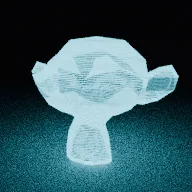
What it takes and gives
- Operator
- baltor.material_hologram
- Parameters
- material_name, color, line_density, line_width, rim, glitch, brightness, assign
- Result
- One transparent emissive material; assigned to the active object.
- Blender
- 4.2 or later
- Axes
- Blender Z up, -Y forward
- Units
- metres
Limits. Static: scanlines and glitches do not move unless you animate the mapping or a value. Lines follow world Z, so they stay horizontal when the object rotates. Transparency through a Transparent BSDF costs extra samples; EEVEE needs blended or dithered render settings. Rendered here with Cycles CPU only. Verified in Blender 5.2.1; written for the 4.2 API.
Details
- Kind
- Blender tool
- Engine
- Blender 4.2 or later
- Files
- 11 files, 129.6 KB
- Licence
- MIT
- Declared effects
- runs commands
- Checked with
- Blender 5.2.1, background (Cycles CPU for previews)
- Checks
- addon install and enable, operator runs with defaults, blender data matches core, addon disable unregisters, script mode runs, clean reopen addon file, clean reopen script file, gltf separate export, engine output clean
- Techniques
- Scanlines from the fractional part of height times density, Fresnel rim from the Layer Weight node, Thresholded noise along one axis for bands
- Tags
- blender, material, shader nodes, hologram, sci-fi, emission, transparent
- Identity
library.supply.creative_originals.e0cc7370d295aefeacdce831.d634351e5f3f4078- Version
d634351e5f3f40783c5ecf007cf640a5e3eb2d3813db9669694e6c546f6c6142
The version is the SHA-256 of the item your harness downloads; every file in it names its own checksum.
Related files
 Neon tube material with a glass sheathIn your harness
 Wireframe overlay materialIn your harness
Something wrong with this item, its rights or its safety? Report it on the support page, or from your harness after a download.