
Triplanar box-projected image material
In your harnessBlender toolMIT
Build an image material that needs no UV map: object coordinates scaled to a texture size in metres feed an Image Texture in box projection with a soft blend, using a given image or a generated UV grid. Use it for scanned or generated meshes, kitbash parts and blockouts.
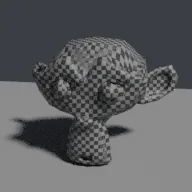
What it takes and gives
- Operator
- baltor.material_triplanar_box
- Parameters
- material_name, image_path, texture_size, blend, grid_resolution, roughness, assign
- Result
- One material with a box-projected image; assigned to the active object.
- Blender
- 4.2 or later
- Axes
- Blender Z up, -Y forward
- Units
- metres
Limits. Box projection follows object axes, so rotating the object rotates the projection with it and curved surfaces show stretching in the blend zones. Normal maps are not projected; this is a colour texture tool. The generated grid is for judging scale and seams, not final look. Rendered here with Cycles CPU only. Verified in Blender 5.2.1; written for the 4.2 API.
Details
- Kind
- Blender tool
- Engine
- Blender 4.2 or later
- Files
- 11 files, 119.5 KB
- Licence
- MIT
- Declared effects
- runs commands
- Checked with
- Blender 5.2.1, background (Cycles CPU for previews)
- Checks
- addon install and enable, operator runs with defaults, blender data matches core, addon disable unregisters, script mode runs, clean reopen addon file, clean reopen script file, gltf separate export, engine output clean
- Techniques
- Box (triplanar) projection of an image along the three object axes, Texture size in metres by scaling object coordinates, Generated UV grid image
- Tags
- blender, material, shader nodes, triplanar, box projection, image texture, uv free
- Identity
library.supply.creative_originals.156f53ebbac922a9c65695e8.d7961835d0bfe437- Version
d7961835d0bfe4377ba0d1d7a939c12a85cd37ded3d59f01f60ce8e9935d1dfb
The version is the SHA-256 of the item your harness downloads; every file in it names its own checksum.
Related files
 PBR material from a folder of mapsIn your harness
Something wrong with this item, its rights or its safety? Report it on the support page, or from your harness after a download.