
Lava lamp metaballs
In your harnessGodot shaderMIT
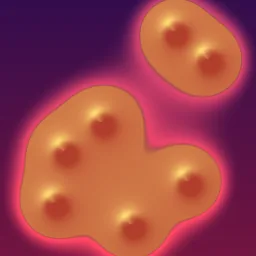
Soft blobs that merge and split like a lava lamp: several metaballs follow Lissajous paths, their summed inverse-square field is thresholded into shapes, shaded by the field gradient and given a glowing rim.
What it takes and gives
- Shader type
- canvas_item
- Parameters
- blob_color (vec4 = 1, 0.35, 0.25, 1), highlight_color (vec4 = 1, 0.85, 0.45, 1), background_top (vec4 = 0.2, 0.05, 0.3, 1), background_bottom (vec4 = 0.45, 0.08, 0.25, 1), blob_count (int = 7), blob_size (float = 0.06), threshold (float = 1), speed (float = 0.4) and 1 more
- Use it on
- A ColorRect (or any CanvasItem) sized to the area to fill; UVs span 0 to 1 across it.
- Result
- Orange blobs with yellow highlights flowing and merging over a purple gradient.
- Renderers
- compatibility: compiled and rendered, forward plus: not verified, mobile: not verified
- Placement
- res://baltor/godot_shaders/metaball_blobs_2d/
Limits. Cost grows with blob count times three field evaluations per pixel. Blobs are 2D: no occlusion or depth.
Details
- Kind
- Godot shader
- Engine
- Godot 4.3 or later
- Files
- 11 files, 88.5 KB
- Licence
- MIT
- Declared effects
- reads files, runs commands
- Checked with
- Godot 4.7.2, opengl3 compatibility (Mesa llvmpipe, Xvfb)
- Checks
- contract static, engine run, engine log clean, shader in scene, capture written, render not uniform, shader changes pixels
- Techniques
- Metaballs (summed inverse-square field, after Blinn 1982), Lissajous motion paths, Gradient-based shading
- Tags
- godot shader, canvas item, metaballs, lava lamp, blobs, background, procedural
- Identity
library.supply.creative_originals.72baaf1e37b63c5de1eeec5c.cb66d6c7ae60db4d- Version
cb66d6c7ae60db4db053ebafd36ff298ad690052cc8034e5715d6e07410bb167
The version is the SHA-256 of the item your harness downloads; every file in it names its own checksum.
Related files
 Classic sine plasma with a cosine paletteIn your harness
Something wrong with this item, its rights or its safety? Report it on the support page, or from your harness after a download.