
Soft outer glow around a sprite
In your harnessGodot shaderMIT
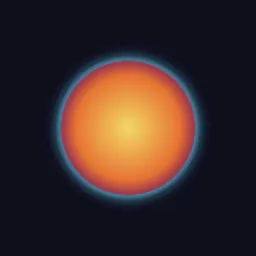
Surround a sprite's shape with a soft coloured glow: alpha is gathered in rings around each texel, giving a smooth halo that can pulse, drawn under the sprite.
What it takes and gives
- Shader type
- canvas_item
- Parameters
- glow_color (vec4 = 0.4, 0.85, 1, 1), radius (float = 10), intensity (float = 1.6), rings (int = 3), directions (int = 12), pulse_speed (float = 2), pulse_depth (float = 0.3)
- Use it on
- A Sprite2D (or other textured CanvasItem) with transparent space around its shape, assigned to the node as usual. Effects outside the shape are drawn inside the texture rectangle, so the texture needs a margin.
- Result
- An orange disc surrounded by a soft cyan halo on a dark background.
- Renderers
- compatibility: compiled and rendered, forward plus: not verified, mobile: not verified
- Placement
- res://baltor/godot_shaders/sprite_soft_glow/
Limits. Effects outside the shape are drawn inside the texture rectangle, so the texture needs a margin. Cost is rings times directions samples per pixel (36 by default).
Details
- Kind
- Godot shader
- Engine
- Godot 4.3 or later
- Files
- 11 files, 68.0 KB
- Licence
- MIT
- Declared effects
- reads files, runs commands
- Checked with
- Godot 4.7.2, opengl3 compatibility (Mesa llvmpipe, Xvfb)
- Checks
- contract static, engine run, engine log clean, shader in scene, capture written, render not uniform, shader changes pixels
- Techniques
- Ring-sampled alpha gathering (radial blur of the mask), Over compositing of a halo
- Tags
- godot shader, canvas item, glow, halo, aura, sprite, 2d
- Identity
library.supply.creative_originals.254c9c9cc56f0be3b6a9a1b8.dc370671fc3add1d- Version
dc370671fc3add1dbcc1ae041369717b678fb9c580c13bb10db712b4ff78fe6a
The version is the SHA-256 of the item your harness downloads; every file in it names its own checksum.
Related files
 Pixel-exact sprite outlineIn your harness
 Soft drop shadow inside the sprite rectangleIn your harness
 Emissive Fresnel rim glow with pulseIn your harness
Something wrong with this item, its rights or its safety? Report it on the support page, or from your harness after a download.