
Tesseract from 4-bit vertex labels
In your harness4D geometry toolMIT
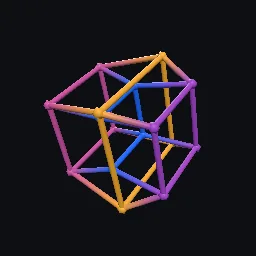
Build the tesseract exactly (edges, square faces and cubic cells from bit patterns), rotate it in any of the six planes and write a projected wireframe glTF or a polytope JSON record. Also gives its Gray code cycle and inscribed 16-cells.
What it takes and gives
- Entry points
- vertices, polytope, gray_cycle, is_hamiltonian_cycle, half_tesseracts, is_sixteen_cell, wireframe, export and 3 more
- Outputs
- example.gltf
- Coordinates
- x, y, z, w; projected to Godot/glTF +Y up
Limits. Tubes are straight segments between projected vertices, so under the stereographic projection they are chords, not the circular arcs that are the true images of great-circle edges. The perspective projection refuses an eye inside the rotated object. Depth colour is linear in the rotated w coordinate and is not physically based.
Details
- Kind
- 4D geometry tool
- Engine
- Python 3.10 or later
- Files
- 10 files, 186.0 KB
- Licence
- MIT
- Declared effects
- reads files, runs commands, writes files
- Checked with
- Godot 4.7.2, gl_compatibility (opengl3, Mesa llvmpipe under Xvfb)
- Checks
- cli rebuilds example, gltf structure example, cli example runs, cli example gltf structure, godot loads example, godot loads cli tesseract lines, preview render
- Techniques
- Schlafli symbol {4,3,3}, hypercube as the product of four intervals, reflected binary Gray code, demitesseract (alternated tesseract) is the 16-cell, central perspective projection from a 4D eye point
- Tags
- 4d, tesseract, hypercube, 8-cell, polytope, gltf, wireframe, gray code
- Identity
library.supply.creative_originals.6b11b1b4b6e77fcacc73e9df.1396715b484b7b99- Version
1396715b484b7b99a29becc02c9fbd1516479cca93488e1c0b0095fa26c8c958
The version is the SHA-256 of the item your harness downloads; every file in it names its own checksum.
Related files
 16-cell from signed axesIn your harness
 Exact hyperplane slice sweep as glTF morph targetsIn your harness
Something wrong with this item, its rights or its safety? Report it on the support page, or from your harness after a download.