
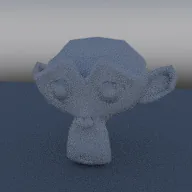
Studio gradient world with a horizon band
In your harnessBlender toolMIT
Build a world that blends ground, horizon and zenith colours by the elevation of the view direction, with an adjustable horizon height and band softness and a separate backdrop strength for the camera. Use it for clean studio renders and stylized skies.
What it takes and gives
- Operator
- baltor.world_gradient_studio
- Parameters
- ground_color, horizon_color, zenith_color, horizon_height, softness, strength, camera_strength
- Result
- A world named Baltor Gradient Studio set as the scene world.
- Blender
- 4.2 or later
- Axes
- Blender Z up, -Y forward
- Units
- metres
Limits. A smooth three-colour gradient: no sun, clouds or image detail, so it gives soft light without shadows from a direction. The camera strength uses the Light Path node, which EEVEE honours only partly. Rendered here with Cycles CPU only. Verified in Blender 5.2.1; written for the 4.2 API.
Details
- Kind
- Blender tool
- Engine
- Blender 4.2 or later
- Files
- 11 files, 117.6 KB
- Licence
- MIT
- Declared effects
- runs commands
- Checked with
- Blender 5.2.1, background (Cycles CPU for previews)
- Checks
- addon install and enable, operator runs with defaults, blender data matches core, addon disable unregisters, script mode runs, clean reopen addon file, clean reopen script file, gltf separate export, engine output clean
- Techniques
- Elevation from the Z component of the world direction, Colour ramp with stops at sin(elevation) positions, Light Path camera ray mix for a separate backdrop strength
- Tags
- blender, world, gradient, studio, backdrop, lighting, stylized
- Identity
library.supply.creative_originals.fee2dde5737d68b41e1f3f11.41deb17514263ed8- Version
41deb17514263ed868f37daff273256280403262e75bd65bb698e79f0a453023
The version is the SHA-256 of the item your harness downloads; every file in it names its own checksum.
Related files
 HDRI environment world with a solid camera backdropIn your harness
 Physical sky with a matching sun lampIn your harness
Something wrong with this item, its rights or its safety? Report it on the support page, or from your harness after a download.