
Procedural brick material sized in metres
In your harnessBlender toolMIT
Build a brick node material whose brick width, course height and mortar joint are plain metres, oriented to a wall or floor plane, with two-colour brick variation, grime, rough mortar and raised bricks. Use it for walls and paving without texture files.
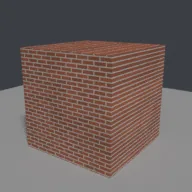
What it takes and gives
- Operator
- baltor.material_brick_procedural
- Parameters
- material_name, orientation, brick_width, row_height, mortar_size, offset, color_a, color_b and 4 more
- Result
- One material with a node tree; assigned to the active object.
- Blender
- 4.2 or later
- Axes
- Blender Z up, -Y forward
- Units
- metres
Limits. Running bond with one offset only; English, Flemish and other bonds need the brick wall generator. Bricks are raised by bump, not displacement, so silhouettes stay flat. Object coordinates tie the pattern to the object's origin and scale. Rendered here with Cycles CPU only. Verified in Blender 5.2.1; written for the 4.2 API.
Details
- Kind
- Blender tool
- Engine
- Blender 4.2 or later
- Files
- 11 files, 130.8 KB
- Licence
- MIT
- Declared effects
- runs commands
- Checked with
- Blender 5.2.1, background (Cycles CPU for previews)
- Checks
- addon install and enable, operator runs with defaults, blender data matches core, addon disable unregisters, script mode runs, clean reopen addon file, clean reopen script file, gltf separate export, engine output clean
- Techniques
- Brick Texture node at unit scale so its sizes are object-space metres, Swizzling object coordinates to orient a planar pattern, Mortar mask driving bump and roughness
- Tags
- blender, material, shader nodes, brick, masonry, procedural texture, architecture
- Identity
library.supply.creative_originals.bf7b04d1e9a203b487efdcbc.9ddac065a7e66467- Version
9ddac065a7e664678db8942f6c63a1be0131d831bbd3dce6299147b7090a5da1
The version is the SHA-256 of the item your harness downloads; every file in it names its own checksum.
Related files
 Brick wall in English, Flemish and other bondsIn your harness
 Glazed ceramic tile material with bevelled edgesIn your harness
 Cast concrete material with pores and board seamsIn your harness
Something wrong with this item, its rights or its safety? Report it on the support page, or from your harness after a download.